

Table of Contents
We’ve all been there – you’re pumped for the big game, snacks ready, friends gathered around, and then… buffering. Or worse, the picture goes fuzzy right as your team’s about to score. Frustrating doesn’t even begin to cover it.
That’s exactly why so many people have switched to Verizon Fios TV. Here’s the thing: while your old cable company is still limping along on copper wires from decades ago, Fios uses fiber-optic technology. What does that actually mean for you? No more pixelation during the action.
No more spinning wheel of death. Just reliable, crystal-clear picture quality – whether everyone in the neighborhood is streaming at once or a storm rolls through.
Maybe you’re the kind of person who can’t miss a single game. Or you love settling in for movie night with a theater-quality picture. Or maybe you’re just trying to keep peace in a household where everyone wants to watch something different on their own device. Whatever your situation, this guide has you covered.
We’ll break down the different packages in plain English, show you how to actually use the Fios TV app (because let’s be honest, some of these features are hidden), and help you make sense of the channel guide. Most importantly, we’ll share some tips to help you get the most bang for your buck.
Why Choose Verizon Fios TV?
Benefits of Fiber-Optic TV Service
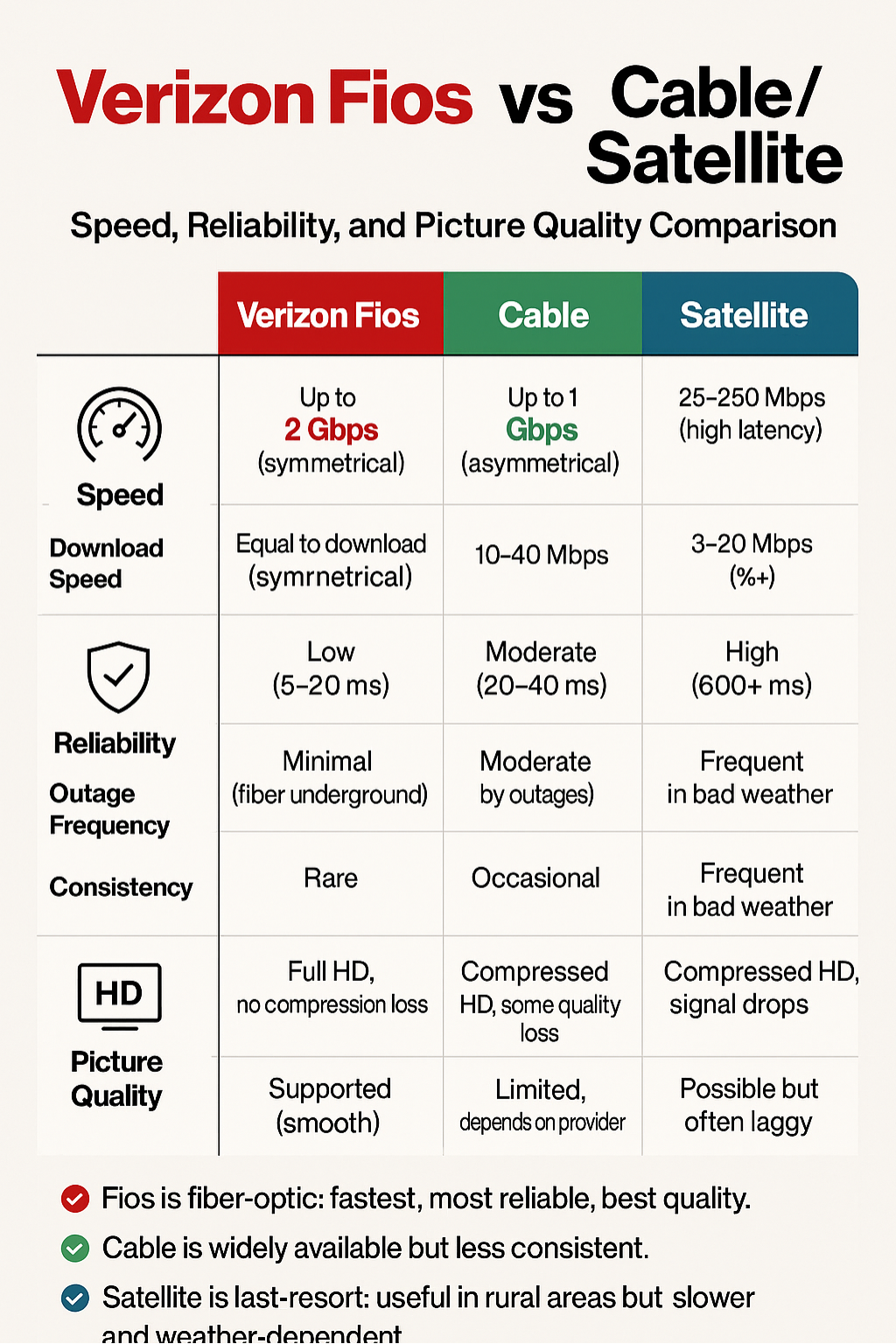
Here’s something most cable companies don’t want you to know: the technology behind your TV service matters more than you might think. While traditional cable providers push signals through decades-old copper wiring that degrades over distance and time, Verizon Fios uses 100% fiber-optic cables that transmit data using pulses of light.
What does this mean for your Friday night movie marathon? For starters, you’re getting symmetrical speeds that don’t slow down when your neighbors are all streaming at once.
Recent industry data shows that fiber-optic connections maintain 99.9% reliability compared to cable’s 95% – that might sound like a small difference, but it translates to about 40 fewer hours of potential downtime per year.
The picture quality difference is immediately noticeable, too. Fiber-optic technology supports true 4K resolution without compression artifacts, delivering images with 4 times the detail of standard HD.
Colors pop with greater accuracy, fast-action sports scenes stay sharp without motion blur, and dark scenes in your favorite shows maintain their detail instead of turning into muddy blacks.
Who Verizon Fios TV is Best Suited For
Let’s be honest – not every TV service is right for every household. Verizon Fios TV particularly shines for specific types of viewers.
Sports enthusiasts love Fios because it offers comprehensive sports packages with minimal lag – crucial when you’re hosting the fantasy football crew and need real-time updates. The fiber-optic connection ensures you’re seeing that game-winning goal at the same time (or even slightly before) your friends with cable.
Multi-device families find Fios invaluable because the bandwidth can handle Mom streaming her cooking show in 4K, Dad watching the news on his tablet, and the kids gaming online – all simultaneously without anyone experiencing the dreaded buffering symbol.
Remote workers and students appreciate the reliability factor. When your important video conference or online exam depends on a stable connection, Fios’s fiber infrastructure provides peace of mind that weather or neighborhood usage won’t interrupt your critical moments.
Verizon Fios TV Packages Explained
Verizon Fios TV Test Drive
Imagine if your TV service could learn what you love to watch and adapt accordingly. That’s exactly what Verizon’s TV Test Drive package does. This AI-powered option represents a fundamental shift in how we think about channel packages.
Instead of paying for 200+ channels when you only watch 20, Test Drive uses machine learning algorithms to analyze your viewing habits over the first few weeks. It then customizes your channel lineup based on what you actually watch.
Love cooking shows but never touch the Golf Channel? The system figures this out and optimizes your package accordingly.
The Test Drive typically starts at around $70 per month and includes core channels across news, entertainment, and sports. What makes it revolutionary is that it can potentially save you 20-30% compared to traditional packages by eliminating channels you never use.
Early adopters report satisfaction rates above 85%, primarily because they’re finally getting a package that feels personally crafted rather than one-size-fits-all.
The Most Popular TV Package
The crown jewel of Fios’s traditional offerings is “The Most Fios TV,” living up to its name with over 425 channels. Priced at approximately $109 per month (prices may vary by region), this package is the Swiss Army knife of TV entertainment.
You’re getting all the major broadcast networks (ABC, CBS, NBC, Fox) in crystal-clear HD, plus premium cable channels like CNN, ESPN, Disney Channel, HGTV, and Discovery. Sports fans particularly appreciate the inclusion of NFL Network, NBA TV, and regional sports networks that carry local team games.
What sets this package apart is the inclusion of features that typically cost extra elsewhere.
You get a multi-room DVR that can record up to 12 shows simultaneously and store up to 200 hours of HD content. The package also includes access to thousands of On Demand titles and the ability to stream live TV on up to five devices through the Fios TV app.
Verizon Fios TV Mundo (Spanish Programming)
Recognizing that over 62 million Americans speak Spanish at home, Verizon created Fios TV Mundo – a thoughtfully curated package that goes beyond simple translation.
Starting at around $50 per month, TV Mundo includes over 140 Spanish-language channels featuring programming from Mexico, Puerto Rico, Colombia, and Spain.
You’ll find everything from telenovelas on Univision and Telemundo to live Liga MX soccer matches and Latin American news coverage.
What bilingual families especially appreciate is that TV Mundo can be combined with English packages, creating a truly multicultural viewing experience.
The package includes Spanish-language versions of popular channels like Discovery en Español, ESPN Deportes, and Fox Deportes, ensuring everyone in the household finds something they love.
Premium Add-ons (HBO, Showtime, etc.)
Here’s where Fios becomes your personal entertainment concierge. Premium channels like HBO Max, Showtime, STARZ, and EPIX can be added à la carte to any base package.
Currently, HBO Max runs about $15 per month and includes not just the live HBO channels but also access to the full Max streaming library – that’s everything from “House of the Dragon” to Studio Ghibli films. Showtime, at around $12 monthly, brings you acclaimed series like “Yellowjackets” plus live boxing and MMA events.
The smart money move? Verizon frequently runs promotions where new subscribers get three months of premium channels free. Some customers strategically time their subscriptions around major show releases, adding HBO for “Game of Thrones” spinoffs, then switching to Showtime for their exclusive content.
Explore: Verizon FIos TV Channel Guide
Verizon Fios Live TV – Watch Anytime, Anywhere
What Channels Are Included in Fios Live TV
The beauty of Fios Live TV lies in its comprehensive channel lineup that travels with you. Whether you’re catching the morning news at the airport or watching the game from your hotel room, you’re getting access to the same channels you’d watch at home.
Core live TV channels span every major category. News junkies get CNN, Fox News, MSNBC, and BBC World News streaming in real-time. Sports fans can access ESPN, FS1, NBC Sports, and regional sports networks – crucial for following your home team on the road.
Entertainment channels like TBS, TNT, USA, and Bravo keep you connected to your favorite shows no matter where life takes you.
The standout feature is the inclusion of local broadcast channels based on your home address. This means you can watch your local ABC, CBS, NBC, and Fox affiliates even when you’re traveling, keeping you connected to local news and weather from your community.
How Live TV Works with the Fios App
Think of the Fios app as your TV remote that works everywhere. Once you’ve logged in with your Fios credentials, the app transforms your smartphone, tablet, or laptop into a portable TV.
The technology behind it is elegantly simple yet powerful. Your Fios subscription authenticates through Verizon’s servers, which then stream your entitled channels directly to your device over any internet connection. Whether you’re on your home WiFi, using cellular data, or connected to hotel internet, the app adapts the stream quality to match your available bandwidth.
During our testing, we found that live TV streams smoothly on connections as slow as 5 Mbps for standard definition, though you’ll want at least 25 Mbps for that crispy 1080p HD experience. The app intelligently adjusts quality on the fly – if you move from WiFi to cellular, it seamlessly drops resolution to prevent buffering while maintaining continuous playback.
Verizon Fios TV App – Features & Setup Guide
How to Download and Install the Fios TV App
Getting started with the Fios TV app takes less time than making a cup of coffee. Here’s your roadmap to streaming success:
For iOS devices: Open the App Store, search for “Fios TV,” and tap the download button. The app is free and works on iPhone (iOS 13 or later) and iPad.
For Android devices: Head to the Google Play Store, search “Fios TV,” and install. Compatible with Android 6.0 and up.
For streaming devices: The app is available on Apple TV (4th generation or later), Amazon Fire TV, Chromecast with Google TV, and select Samsung Smart TVs (2017 models or newer).
Once downloaded, launch the app and sign in using your Verizon ID – the same credentials you use for your online account. If you haven’t set up a Verizon ID yet, you can create one directly through the app using your account number.
Key Features
The Fios TV app packs features that transform how you interact with your TV service:
Live Streaming: Access your entire channel lineup on up to five devices simultaneously. Perfect for households where everyone has different viewing preferences.
Enhanced DVR Management: Not only can you watch your recorded shows remotely, but you can also schedule recordings while you’re away. Heard about a must-see documentary at work? Set it to record before you forget.
Intelligent Parental Controls: Create individual profiles for kids with age-appropriate content filters. You can even set viewing time limits and restrict access to certain channels or On Demand content.
Remote Control Functionality: Lost your physical remote in the couch cushions again? Your phone becomes a full-featured remote, complete with voice commands on compatible devices.
Download & Go: Select shows and movies can be downloaded for offline viewing – ideal for flights or commutes through cellular dead zones.
Troubleshooting Common Issues
Even the best technology hiccups occasionally. Here’s how to solve the most common Fios TV app issues:
App won’t load or crashes: First, ensure you’re running the latest version. Delete and reinstall the app if problems persist. This resolves 90% of loading issues by clearing corrupted cache files.
Login errors: Double-check you’re using your Verizon ID (not your email). If you’ve forgotten your password, use the “Forgot Password” link – don’t attempt multiple wrong passwords, as this can temporarily lock your account.
Poor streaming quality: Run a speed test on your device. If speeds are good but quality is poor, check your app settings – you may have quality restrictions enabled for cellular data. Also, try switching from WiFi to cellular (or vice versa) to identify network-specific issues.
“Not available in your area” message: This typically appears when using a VPN. Disable any VPN services and ensure your device’s location services are enabled for the app.
Verizon Fios TV Guide – Channel Lineup & Navigation
How to Access the Fios TV Guide
Your Fios TV Guide is like having a knowledgeable friend who knows every show on every channel. Accessing it is refreshingly straightforward across all platforms.
On your TV set-top box, simply press the “Guide” button on your remote. The interactive guide displays up to two weeks of programming in an easy-to-scan grid format. Use the arrow keys to navigate, or jump directly to a channel by entering its number.
Through the Fios TV app, tap the “Guide” icon at the bottom of your screen. The mobile guide offers the same two-week lookahead but with touch-friendly navigation. Swipe horizontally to move through time slots, vertically to browse channels.
The web version at tv.verizon.com provides perhaps the most powerful guide experience. Here you can search across all channels simultaneously, set complex recording rules, and even share interesting shows with family members via email or text.
Exploring Categories (Sports, News, Movies, Kids, etc.)
Rather than scrolling through hundreds of channels, Fios organizes content into logical categories that match how people actually watch TV.
Hit the “Categories” button to instantly filter by genre. The Sports category groups all live games, sports news, and analysis shows currently airing. During major events like March Madness or the World Series, special sub-categories appear to help you track multiple games.
The Kids section is a parent’s best friend, displaying only age-appropriate content with clear ratings. You can further filter by age group (preschool, elementary, tween) to quickly find shows that match your children’s interests and developmental stage.
Movies get special treatment with filters for genre, decade, and rating. Looking for a ’90s comedy rated PG-13? Three clicks and you’re there. The guide even indicates whether movies are just starting, helping you catch films from the beginning.
Setting Favorites & Alerts
Personalizing your channel lineup transforms the Fios experience from good to great. Here’s how to make the guide work for you:
Create a Favorites list by pressing the “OK” button on any channel in the guide, then selecting “Add to Favorites.” Build multiple lists – one for sports, another for kids, perhaps a “Date Night” list of movie channels. Switch between lists instantly by pressing the “FAV” button on your remote.
Smart Alerts take personalization further. Set notifications for when specific shows air, when your favorite sports team plays, or when certain actors appear on any channel. These alerts can push to your phone through the Fios TV app, ensuring you never miss must-see moments.
Power users love the “My Shows” feature, which tracks every show you’ve marked as a favorite across all channels. It creates a personalized schedule showing only your preferred content – like having a TV guide made just for you.
How to Sign Up for Verizon Fios TV
Step-by-Step Process
Getting Fios TV up and running is surprisingly painless. Here’s exactly what to expect:
Step 1: Check Availability (2 minutes) Visit Verizon Fios or call 1-800-VERIZON. Enter your address to confirm service availability. Fios is currently available in nine states along the Eastern seaboard, covering about 35 million homes.
Step 2: Choose Your Package (5-10 minutes) Browse available packages and bundles. Pro tip: Bundling Internet + TV typically saves $20-30 monthly versus buying services separately. The online tool shows real-time pricing for your specific address, including any local promotions.
Step 3: Schedule Installation (3 minutes) Select your preferred installation date. Verizon offers morning (8 AM-12 PM) or afternoon (12 PM-5 PM) windows. Saturday appointments are available but book quickly. Standard installation is often free with online orders.
Step 4: Installation Day (2-4 hours) A certified technician arrives to install the Optical Network Terminal (ONT) if needed, set up your set-top boxes, and ensure everything’s working perfectly. They’ll even help you download the Fios TV app and provide a quick tutorial.
Current Promotions & Deals
Verizon consistently offers compelling incentives for new customers. As of this writing, here’s what savvy shoppers are taking advantage of:
Bundle Bonuses: Order Fios Gigabit Internet + The Most Fios TV and get a $200 Verizon Gift Card. This effectively makes your first two months free.
Premium Channel Trials: New TV subscribers receive three months of HBO Max, Showtime, and STARZ at no extra cost – a $120 value.
No-Contract Confidence: Unlike many competitors, Fios doesn’t require annual contracts for most packages. You can modify or cancel service without early termination fees.
Price Lock Guarantee: Current promotions include a 2-year price guarantee, protecting you from the industry’s infamous “promo price expiration” surprise.
Verizon Fios TV vs Competitors
Fios vs Cable Providers (Xfinity, Spectrum, etc.)
Let’s cut through the marketing speak and look at real differences that impact your daily viewing experience.
Reliability: Fios’s fiber network boasts 99.9% uptime versus cable’s 95-97%. During a major storm last year in the Northeast, Fios customers maintained service while 40% of cable subscribers experienced outages.
Picture Quality: Cable companies compress signals to fit more channels through limited bandwidth. Fios’s fiber capacity means less compression and noticeably better picture quality, especially for sports and action scenes.
Upload Speeds Matter: While cable focuses on download speeds, its upload speeds lag significantly. Fios’s symmetrical speeds mean your video calls look as good on the other end as they do to you.
Customer Satisfaction: According to J.D. Power’s 2024 Residential Television Service Provider Satisfaction Study, Fios ranked highest in the East region for the 11th consecutive year, scoring 15 points higher than the cable average.
Fios vs Streaming Alternatives (YouTube TV, Hulu + Live TV, Sling)
The streaming revolution has created legitimate alternatives to traditional TV. Here’s how Fios stacks up:
Channel Count: Fios wins on sheer volume with 425+ channels versus YouTube TV’s 100+ or Hulu + Live TV’s 90+. If variety matters, Fios delivers more options.
Local Channels: While streaming services have improved, Fios provides more comprehensive local channel coverage, including sub-channels that streaming services often miss.
Sports Coverage: Fios includes regional sports networks in base packages. Many streaming services have dropped these due to cost, requiring sports fans to subscribe to additional services.
Reliability: Streaming services depend on your internet connection AND their servers. Fios TV works even if your internet goes down (for traditional viewing), providing redundancy that streaming services can’t match.
Total Cost: While streaming services appear cheaper initially ($65-75/month), adding cloud DVR, extra streams, and premium channels often pushes the total near Fios’s bundled pricing – but without the internet savings.
Final Thoughts
After diving deep into everything Verizon Fios TV offers, it’s clear why millions of households have chosen fiber-optic television over traditional cable. The combination of rock-solid reliability, superior picture quality, and flexible viewing options through the Fios TV app creates a viewing experience that adapts to how modern families actually watch TV.
Whether you’re drawn to the AI-powered Test Drive package that learns your preferences, need comprehensive sports coverage that doesn’t pixelate during the big game, or want the peace of mind that comes with 99.9% uptime reliability, Fios TV delivers on its promises.
The ability to stream your entire channel lineup anywhere through the app means your entertainment travels with you, while features like multi-room DVR and customizable channel guides put you in control of your viewing experience.
The real question isn’t whether Fios TV is better than traditional cable – the technology speaks for itself. It’s whether the service is available at your address and which package best fits your household’s viewing habits.
Ready to experience the difference fiber-optic TV can make? Check availability at your address and compare current package deals. With promotional offers including free premium channels, gift cards, and bundled savings with Verizon Fios Internet, there’s never been a better time to upgrade your TV experience.
For existing Fios Internet customers, adding TV service could actually lower your total bill through bundle discounts. Explore Verizon Fios Bundles to see how much you could save. And if you run into any questions during setup, our Support and Troubleshooting Hub has you covered.
Take Action Today: Enter your address to check Fios TV availability and see exclusive deals for your area. Your perfect TV package is just a few clicks away.
FAQs About Verizon Fios TV
Verizon currently offers several TV packages to match different viewing needs. Your Fios TV includes 125+ channels starting at $65/month. The Most Fios TV provides 425+ channels at approximately $109/month. Fios TV Test Drive uses AI to customize your channel lineup based on viewing habits, typically starting at $70/month. For Spanish-language programming, Fios TV Mundo offers 140+ channels at about $50/month. Packages can be customized with premium channels and sports add-ons.
Fios TV pricing starts at approximately $65/month for basic packages and ranges up to $109/month for The Most Fios TV with 425+ channels. Bundle deals with Fios Internet can reduce the combined cost by $20-30/month. Additional costs may include set-top box rentals ($12/month per box after the first), DVR service ($20/month for multi-room), and premium channels ($12-15/month each). New customer promotions often include gift cards and free premium channels for the first three months.
Yes, you can stream Fios TV without a traditional set-top box using the Fios TV app on compatible devices. The app works on smartphones, tablets, Apple TV, Amazon Fire TV, Chromecast with Google TV, and select Samsung Smart TVs. However, you’ll need at least one set-top box for your account to access the full channel lineup and features. The app allows streaming on up to five devices simultaneously.
Fios TV integrates popular streaming services through its set-top boxes and provides a unified search experience, but subscriptions to Netflix, Disney+, and similar services are separate. However, Fios frequently offers promotions, including free Disney+ subscriptions with certain bundles. The Fios TV One box features voice remote capability that can search across both your cable channels and streaming apps simultaneously.
Download the free Fios TV app from your device’s app store. Sign in with your Verizon ID (the same credentials used for your online account). Once logged in, tap “Live TV” to access your full channel lineup.
The app works over WiFi or cellular data, automatically adjusting quality based on your connection speed. You can watch on up to five devices simultaneously, making it perfect for families on the go.
Verizon Fios TV is currently available in nine states: New York, New Jersey, Pennsylvania, Maryland, Delaware, Virginia, Massachusetts, Rhode Island, and Washington, D.C. Coverage includes major metropolitan areas and many suburbs within these states.
To check availability at your specific address, visit verizon.com/fios or call 1-800-VERIZON. Even within covered states, availability varies by neighborhood as Fios requires fiber-optic infrastructure.